 VeritableRoll
IMPORT / ORGANISE / RECONCILE
Membership database software.
Built around your register.
Turn spreadsheets and exports into a controlled membership register. Preserve the numbers people already use, organise branches and grades, and keep a clear history of reviewed changes.
14 days free · No card required · No automatic charge
Plans from £39/month plus applicable VAT
01 / CONTROL THE MIGRATION
Upload, match, review, then confirm.
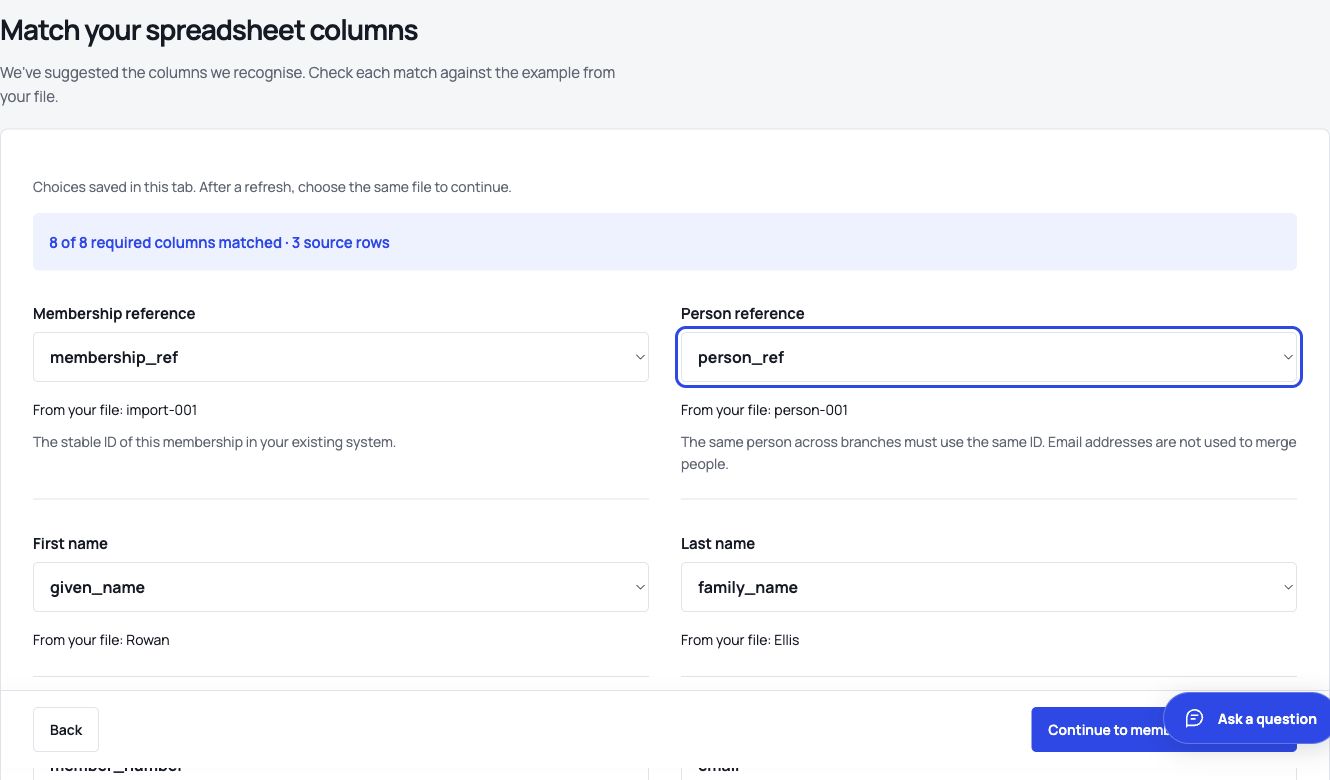
Import a CSV, inspect sample values and match each source column to the register. Map branches and membership types before processing. Rows with missing, invalid or conflicting data remain visible for correction.
- Take a dated export from the current register.
- Match source fields and preserve stable external references.
- Review new, existing and unresolved records separately.
- Confirm the import and reconcile its receipt to the source total.
Download the free membership database template → Then use the worked import guide to test its three fictional records.
02 / KEEP IDENTIFIERS STABLE
A person, a membership and a source number are different things.
One person may hold memberships in more than one branch. A membership can retain the number known to the member while the source system’s person and membership references remain available for later imports and reconciliation.
Email addresses are useful contact details, but they are not dependable identifiers. Shared and changed addresses should not silently merge people. VeritableRoll uses explicit references and flags conflicts for review.
| Record | Example | Purpose |
|---|---|---|
| Person | EX-P001 | The individual represented in the register. |
| Membership | EX-M001 | The person’s membership of a body or branch. |
| Member number | 000042 | The external number used by members and staff. |
| Source | Legacy CRM export | The system and import that supplied the record. |
03 / MODEL THE ORGANISATION
One national register, with controlled local access.
Map source labels to the correct body, branch and grade. Local staff see records within their assigned scope; central teams can receive submissions and review decisions across the organisation. A person’s membership in one branch does not reveal unrelated memberships to a branch user.
Record corrections and renewal submissions follow reviewed workflows. The database supports the operational decision rather than hiding it behind a bulk overwrite.
04 / RETAIN CONTROL
Export the register and its reviewed outcomes.
Your organisation can export its records and reconcile them with the source. Account exit is a defined process rather than a proprietary dead end. Provider connections and write-back are enabled only after their field mappings and responsibilities are agreed.
VeritableRoll also provides a public API, outbound webhooks and documented integrations for accounting, communications, payments, events, identity and CRM systems. Review integration scopes and activation requirements →
Membership database questions
Can we import our existing Excel membership list?
Yes. Save it as CSV UTF-8, match its columns and review flagged rows before confirming the import. A free template and fictional example are available.
Will leading zeros in member numbers be preserved?
Yes, when the source field is supplied as text. The import preview lets you confirm a number such as 000042 before processing.
Can one person belong to two branches?
Yes. A person and their memberships are modelled separately, with branch access applied to the relevant membership records.
Is VeritableRoll a general CRM?
It is focused on membership registers, renewals, evidence and approvals. It can connect to CRM platforms for broader sales or relationship-management work.