 VeritableRoll
THE MEMBERSHIP SOFTWARE BUYER’S GUIDE
Choose membership software around the work your team does.
Compare member records, renewals, payments and permissions with a practical trial checklist for UK associations, clubs and professional bodies.
By VeritableRoll · Updated · We make membership software. This guide explains how to evaluate it, including ours.
What is membership management software?
Membership management software keeps an organisation’s member records and the work around them in one system. Depending on the product, that can include joining forms, membership types, subscriptions, renewals, member self-service, communications, events and reporting.
The useful question is what your team must complete. A club may need to collect an annual fee and update a mailing list. A professional body may also need to verify CPD, review evidence, route an exception to an authorised person and record why a renewal was approved. Write down those steps before comparing feature lists.
Which type of membership software do you need?
| Organisation | Likely priorities | A useful trial question |
|---|---|---|
| Club or society | Joining, fees, renewals, member updates and volunteer administration. | Can a new volunteer complete a renewal without recreating the spreadsheet? |
| Association with branches | A shared register, local permissions, branch submissions and central reporting. | Can a branch officer work on their members without seeing unrelated branches? |
| Professional body | Membership grades, evidence periods, CPD requirements and reviewed exceptions. | Can we explain the decision using the requirements and evidence that applied then? |
| Gym or studio | Recurring billing, class bookings, attendance and any door-access integration. | Can we complete a booking and check-in with the equipment we actually use? |
| Paid content community | Content access, discussion, subscription changes and account recovery. | Does content access change correctly when a subscription ends? |
Some organisations need a combination. Separate essentials from conveniences and ask suppliers to demonstrate the awkward cases, not just the simplest member record.
Eight things to test before choosing a platform
- Your member register. Check individual and organisational membership structures, grades, status, archived records and multiple branch memberships. Confirm which records count towards your allowance.
- Migration from your current system. Import a small representative file. Preserve existing member numbers, including leading zeros; review duplicates and invalid rows; reconcile the result before importing everything. Use our Excel migration example and free template.
- Renewal rules. Test expiry dates, grace periods and requirements beyond payment. For CPD, distinguish an activity log from an eligibility check against the applicable period. Our CPD renewal guide follows a worked evidence review.
- Staff permissions and approvals. Try a local officer account and a separate central reviewer. Check returned submissions and permitted exceptions. See the branch and central approval workflow.
- Member self-service. Follow an invitation, sign in on a phone, update a detail and recover access. Establish which changes require staff review and what happens when a member changes their email address.
- Payments, invoices and reminders. Confirm who receives the member’s money, what needs a separate provider and how failed payments, refunds and cancellations affect membership. Test using the provider’s test environment before taking real payments.
- Reports and decision history. Reconcile totals by branch, grade and status. Pick an earlier renewal and check whether you can explain its outcome after the member’s current details change.
- Support, recovery and exit. Raise a support question during the trial. Review the processing terms, retention and recovery arrangements. Export your records and history, and confirm the cancellation and deletion process.
Run one realistic trial from import to export
Use the same fictional examples with each shortlisted supplier. Ten records across two branches can expose problems that a polished demonstration misses. Include a leading-zero member number, a duplicate row, a missing email, an expired membership and a member with incomplete evidence.
| Step | Action | What to verify |
|---|---|---|
| 1. Create the workspace | Start a trial and invite a colleague. | You can both sign in with appropriate access; the trial’s end and charging terms are clear. |
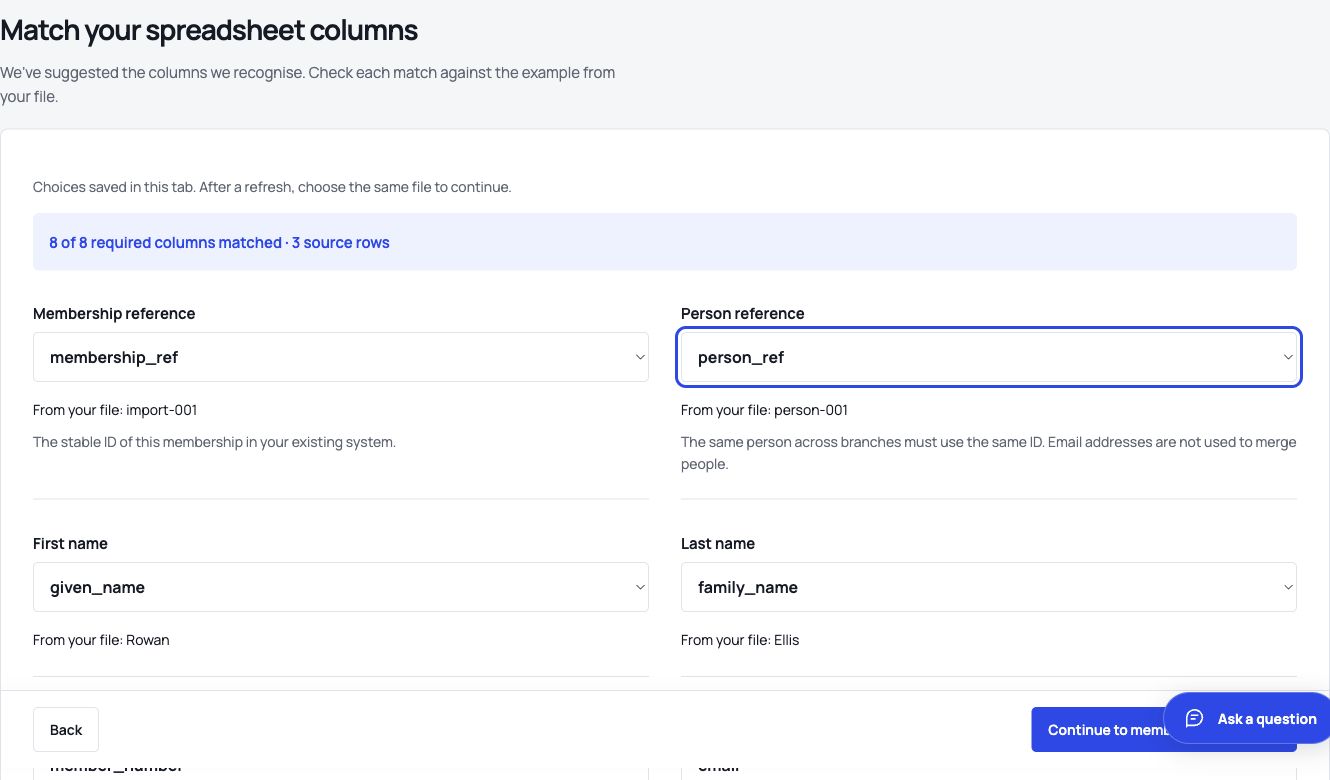
| 2. Import the sample | Match columns, correct a flagged row and confirm the import. | Member numbers survive and every source row is accounted for. Retrying does not create duplicates. |
| 3. Prepare a renewal | Select an incomplete case and add evidence. | The system identifies what is missing and explains the relevant date or threshold. |
| 4. Review the case | Have another authorised person approve it, or return it for correction. | The reviewer’s action and reason are recorded. An unauthorised account cannot approve. |
| 5. Complete and check | Issue the renewal where supported, then reconcile the register. | The issued term, effective date and history agree; a preview is clearly distinguishable from an issued renewal. |
| 6. Export and leave | Export the sample records and inspect cancellation instructions. | You can read the exported data and understand access, retention and deletion after the trial. |
Record elapsed staff time, the number of corrections and every point where you need support. If your membership is larger, agree a separate test of your expected records, retained history and simultaneous staff activity. A ten-record trial checks the workflow; it does not establish capacity.
A simple scorecard for the buying decision
For each essential requirement, record 0: unavailable, 1: needs configuration or further proof, or 2: demonstrated in your trial. Beside the score, keep the example, result, responsible person and any additional cost. Treat an unproven essential as an unresolved decision, even if the supplier’s total score is high.
| Requirement | Evidence to retain | Decision |
|---|---|---|
| Preserve existing member numbers | Imported and exported example containing 0000001. | Score 0–2; record any correction work. |
| Limit branch access | Observed result from a local officer account. | Score 0–2; identify the required plan. |
| Explain a renewal exception | The rule, evidence, reviewer, reason and resulting term. | Score 0–2; record any missing step. |
| Reconcile membership fees | A test payment, invoice and cancellation or reversal. | Score 0–2; name the receiving account and provider fees. |
| Export on exit | An export you can open, plus the agreed retention terms. | Score 0–2; confirm formats and any exit charge. |
How much does membership software cost?
Compare like-for-like member allowances and billing periods. Add migration, required integrations, messaging, platform transaction fees, payment processing and applicable VAT. Establish whether prospects, inactive members or multiple memberships count towards the quoted limit.
Our UK membership software price comparison gives dated, linked figures for VeritableRoll, White Fuse, membermojo and Join It, with a worked annual budget. Use the suppliers’ live quotes for your final decision.
A free trial is useful when you can complete your own workflow. Check whether a card is required, whether charging starts automatically and how long you can export your data after the trial ends.
Where VeritableRoll fits
VeritableRoll is built for associations and professional bodies bringing together a member register, branch teams and reviewed renewals. You can preview and map a CSV import, resolve problems, submit evidence for central review, issue an approved renewal and export the register.
Start alongside your existing system while you check the results. Your organisation defines the requirements and authorised reviewers. Association-to-member payments and bulk messaging need their own provider setup; include that in your evaluation if those services are essential.
Evaluating an AI workflow? See the MCP integration preview for implemented tools, permissions and the setup still needed before production connections.
Standard plans run from 2,000 members and 5 branches to 15,000 members and 30 branches. See prices and allowances, including the route for larger organisations.